


There are two different problems hidden inside the same question: how to erase a Huawei phone, and how to use it again if an old account is requested after the reset. Mixing those steps is what causes most confusion. A factory reset clears data; account verification is a separate security layer.
Decide whether a full reset is really needed
If the phone is slow, has a network problem, or one app keeps crashing, a full reset may be unnecessary. Huawei also offers Reset network settings and Reset all settings, which can fix some problems without deleting personal files.
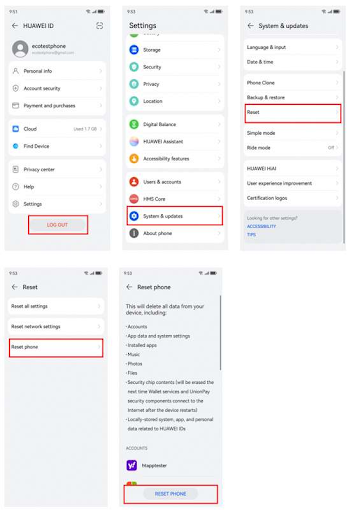
If you still need a factory reset, back up important data first. Huawei’s standard route is Settings > System & updates > Reset > Reset phone. This removes installed apps, account data, settings, and files in internal storage.
What to do if the phone is locked
Owners who have forgotten the lock-screen password can use Huawei’s Recovery mode instructions to erase the device. The method varies by model, but many phones use Power plus Volume Up during startup. From there, select the factory-reset option shown by the device.
You can erase a phone without signing into Google first, but that does not mean the account check disappears. When the device restarts, it may still ask for the Google account or HUAWEI ID that was previously linked to it.
Handle activation checks separately
If the phone asks for a Google account after reset, use Google’s official recovery process. If it asks for a HUAWEI ID, reset that password through Huawei. These checks exist to protect lost or stolen devices, so unofficial removal tools are not part of a normal reset.
Second-hand owners should contact the seller if the previous account is still attached. If the seller cannot help, keep purchase records and contact Huawei support or an authorised service centre.
Rebuild the phone after verification
Once ownership verification is complete, reinstall the apps you actually need. The Huawei Community guide linked through how to reset huawei phone without google account is relevant at this stage because it focuses on Google setup and troubleshooting on Huawei phones.
For users searching how to reset huawei phone without google account, the cleanest way to think about the process is simple: reset the device first, deal with the legitimate account check second, then set up banking, maps, messaging, transport, and other local apps for daily use.
Leave a comment